Read receipts enable you to know when somebody actually opens the email you sent. Gmail's read receipt feature is only available to people who use Gmail via Google apps. That means the enterprise customers who actually pay for Gmail. Of course there are third pary apps like Boomerang and Spypig which can be used for the same, but that also means a third party getting access to your mails/addresses.
Getting read receipts without third party apps.
Here's a simple trick using Google scripts to send emails which will be read-receipt ready without using Google apps. What makes this trick special is that you can do all you composing in your Gmail compose window itself. But instead of hitting the send button, you will be taking a side road -
- First open this spreadsheet and select "File->Make a copy". This will make a private copy in your google drive.
- Next select "Tools->Script Editor". This will bring up a script in a new window or tab.
- In this window, select "File->Manage Versions" and click on "Save a new version". You can leave all fields blank. A new row for version 1 will appear. Just click "OK" button.
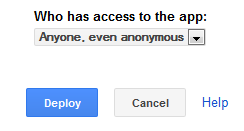
- Now select "Publish->Deploy as webapp". In the popup window, make sure you choose "Anyone, even anonymous" for the question - Who has access to this app. Once done, click on the "Deploy" button
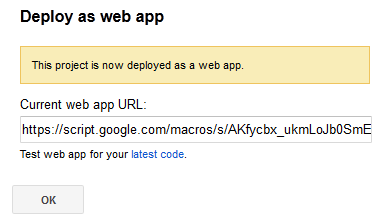
- You will now be shown a confirmation that you app has been deployed as a web app.
- Now close this window and come back to the spreadsheet tab or window. You will find a new menu item "Read Receipt" in the spreadsheet. Select to "Read Receipt->Initialize" and provide required permissions.
All the above steps are one time only. You have now fully setup your read-receipt system. - Now open Gmail in your browser and compose a mail. Fill in required fields including subject and the recepient address(es). Just don't hit the "Send" button yet.
- Open the "Gmail Read Receipt" spreadsheet from your google drive and select "Read Receipt->Send with read receipt". This will open a small popup with a dropdown box showing your latest 5 drafts (subject will be shown).
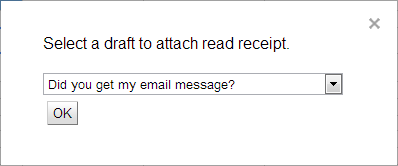
- Select the one you want to send and click the "OK" button.
That's it. You mail will now be sent with a special read-receipt check added to it. Whenever the recepient opens your email, you will get a notification email.
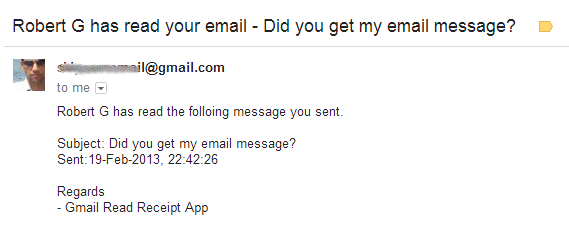
How does this magic happen?
Ok, here's the behind the scene story. First you setup a web application which gets setup with a particular URL. When you send a mail using the spreadsheet menu, a unique id is created for the mail. This id is stored internally as well as added to the email as an invisible image.
When the recepient opens your mail, the image is tried to be loaded whose source is actually the web app URL with the unique id embedded. The web application extracts the unique ID, identifies the sent email and notifies you saying that the recepient has opened your mail.
Is this safe?
Google itself runs entire script (which is your private copy) including the web application under your Google account. There is no third party involved and that means nobody else has any kind of access to anything.
Limitations.
- Google script's sendEmail doesn't automatically copy mails to "Sent Items" as of now. Google engineers are working on fixing this.
- Your draft emails will still be present in the drafts folder for future reference.
So please try out and let me know if you face any issues as comments below.