Consider the scenario where you have a wired internet connection used with your computer and want to share it with other devices like your android phone, iPhone, Xbox or any other device that supports wifi.
The most common way is to use a wireless router which acts as an access point. Just plug in your Internet connection to the wireless router and all your Wifi enabled devices will be able to access the shared Internet connection.
PC internet sharing with an Android device directly via USB.
But what if you don't have a router or you don't want to use your router for the internet sharing? Not to worry. You can easily make the wireless network adapater of your PC or laptop to behave like an access point to which any other Wifi devices can connect.
First some details -
There are two types of wireless networks - ad-hoc network and access point. Ad-hoc network is something where there is no central coordinator and all devices communicate directly with each other. This has some disadvantages including congession.
With an access point, there is a central device which coordinates communication of all devices. All traffic flows through this access point and devices do not communicate with each other directly. This is exactly the case when you use a router.
Ok, so why do I need to know all these?
Although both type of networks can be used to share Wifi, many devices like android phones cannot connect to ad-hoc networks. That means if you configure your computer wifi for adhoc sharing, your android phones will not detect or show the network.
Hmm, so how do I create an access point out of my PC
Although most network cards nowadays allow creating virtual hotspots or access points, the operating system also needs to support virtual networking mode. In case of Windows, only Windows 7 and above support this.
With older versions like Win XP or Vista, you can only create ad-hoc networks which will only work for some devices including iPhone and not for others like your android phones.
To setup an access point in Windows 7, you can use this free software - Virtual Router. Creating an access point is very easy. Just start virtual router, assign a password and click on "Start virtual router". That's it, you have a new wireless network to which any Wifi enabled device can connect and access the internet via your computer's internet conection.
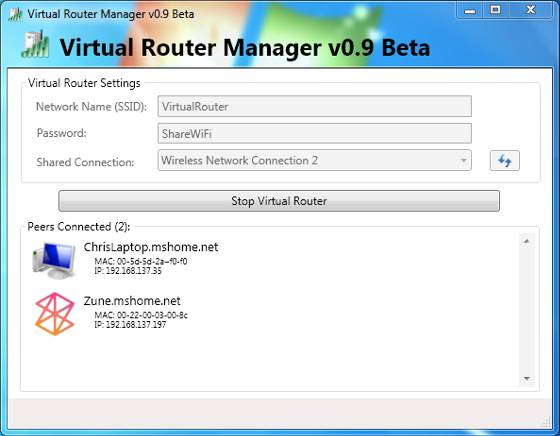
As new devices join the Wireless network, their assigned IP and MAC addresses instantly appear in the Virtual Router window. And you can click the "Stop Virtual Router" button anytime to deactivate the hotspot and disable Internet sharing.
Virtual router currently works on Windows 7 and Windows Server 2008. If you experience issues creating an access point, please check to make sure your wireless adapter is in the list of supported devices.
Also See: How to increase your Wifi Range for Free.
Sep 24, 2011
Check out www.virtualwifirouter.com
Its a nice software with loaded features
Regards
Harsha