A lot of us use Firefox as the default browser. It is fast, smart and efficient as most people put it. But over time after seeing lots of plugins, addons and toolbars come and go, firefox tends to go slow or crashing too often. And most of the problems are due to conflicts and bottlenecks created by these external components.
The first reaction for a sluggish firefox is a complete reinstall. Now that's a pain because the old copy of firefox setup you have on your harddisk would be an outdated version and you will have to download it once again. But firefox just made it too easy with a "Reset" button-
What does reset do in firefox.
Whenever you install firefox, a profile is created for you which stores all your personal settings and data. With the "Reset" button, firefox will create a new profile for you and copies over only a few things like bookmarks, history, passwords, form data and cookies from your old profile.
That means after a reset, you are going to loose few important things including: extensions, themes, open tabs, windows, tab groups, personal dictionary, site-specific preferences, search engines, toolbar customizations, download history, user styles, security certificate settings and plugins.
How to do a firefox reset.
UPDATE: As of now, the reset feature is only available in the beta release of firefox. But it should be available soon in the next stable release.
Follow these steps to reset your Firefox browser -
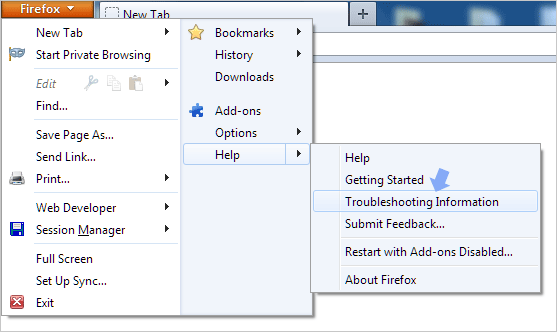
- Go to Help -> Troubleshooting information or type about:support in the address bar.
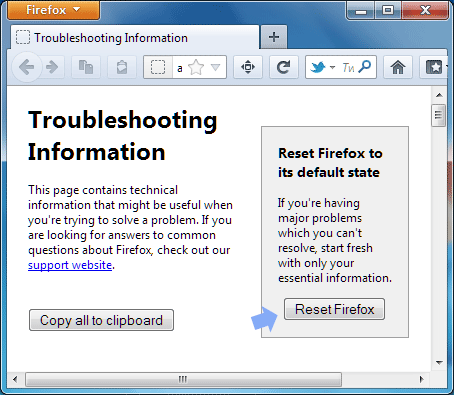
- Click the "Reset Firefox" button and do the same in the confirmation window that pops up.
- Firefox will now close and do the reset in the background. Once done, it will open a window showing all items that were restored from your earlier profile into the new one. Just click "Finish" and firefox will open. That's it, you are done!!
In short, resetting means getting back something like a fresh firefox install + your old bookmarks, cookies, history, passwords and form data. All your problems will be gone and firefox would run like a race horse as it should. Reset is the one stop solution when you feel like starting from zero, although you will loose certain things like your themes, addons and other settings. Here's a video from facebook developers explaining the reset process -