Plugins are small bits of software that add additional functionality in Gimp. Plugins can come in three forms
- Script-fu extensions having .scm extension.
- Python scripts having .py extension.
- Zip files.
The zip files are just plugin scripts zipped to reduce size
Installation of plugins in Gimp involves copying the plugin to an appropriate directory and restarting Gimp. During startup, Gimp scans these directories and loads all plugins available there. So lets see where to put our plugin file.
1. Script-fu plugins with .scm extension.
To install these type of plugins, you need to put them in the Gimp scripts directory. Now this can vary between windows, Linux or Mac. So the easy way to find it is - go to Edit -> Preferences -> Folders -> Scripts from the Gimp top menu. You might find more than one directories listed, select the one in your home directory or user directory in case of windows.
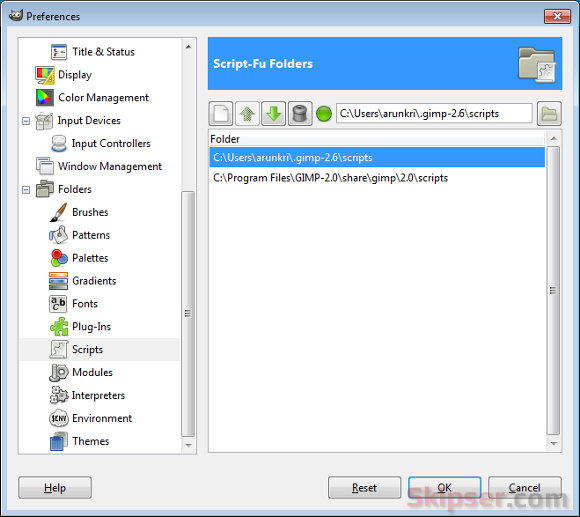
Copy your .scm plugin to this directory and re-start Gimp. You will now see your plugin in Gimp's Script-Fu menu.
2. Plugins with .py extension or zip files.
For these plugins you need to copy the files to the Gimp plugins directory. In case of zip files, you need to extract the contents to the plugins directory and not the zip file itself. To find the plugins directory, go to Edit -> Preferences -> Folders -> Plugins from the top menu. You might find more than one directories listed, select the one in your home directory or user directory in case of windows.
Copy your .py file to this directory or extract everything from the zip file to this directory and re-start gimp. Your plugin will now appear in Gimp menu.
You may also like
Jerrysvoice
Mar 06, 2012
This only applies to Windows users. It's a bit more complicated in Linux because the directories where they are stored is protected. So, one needs to know how to copy files with "root" or "admin" permissions.
Jerrysvoice
Mar 06, 2012
I should clarify my comment. You can add a script to your user script file but if you want to add it for all users, then you have to have "root" permissions to add to the main scripts directory.
Design Share
Mar 06, 2012
The lazy way to get around the root permissions issue would be to open a terminal and do "sudo nautilus" or sudo whatever file manager you're using ie: "sudo dolphin"
Kathy
Mar 06, 2012
i WOULD LIKE TO MAKE A COPYRIGHT WATERMARK TO PUTON MY HANDMADE CARDS i WOULD LIKE TO USE A FLOURISH AND THE NAME BUT WITH SMALL COPYRIGHT SIGN. i AM A COMPKETE NOVICE. i ALREADY HAVE GIMP BUT HAVEN'T REALLY USED YET. Don't know where to start. NEED THE WATERMARK TO BE WHITE OVER MY CARDS . ie Flourish,small copyright sign ,Designed by .........................hotmailco.uk.
Any help would be appreciated. I tried to down load you plugins etc. but where do they go when you download them..........
Arun
Mar 06, 2012
Thanks Jerry, you are absolutely correct. :-)
Arun
Mar 06, 2012
Hi Kathy,
You need to check your browser download directory to find out where the plugins get downloaded. Once you get the file (.scm), just copy it over to your GIMP scripts directory (see details in the post). You will have the plugin available in GIMP.
Now you have to create the watermark image yourself. Once you have it, you can use the plugin to put it at any position on your image. Just select the offsets and positions accordingly.
Krankymax
Mar 26, 2012
If you want the copyright sign, hold down the ALT button on your keyboard and on your numbers pad 0169 © will give you the sign.
Arun
Mar 28, 2012
Not really Jerrysvoice .. You can add folders to the folder list. That means you can create a new folder in your home directory, put the scripts there and add the folder to the list and you are all set.

