After the release of Bing, Microsoft doesn't seem to be keen in supporting other search engines like Google and Yahoo in Internet Explorer. Although IE can't completely do away with Google search, figuring out how to add Google search is becoming tougher and tougher with each new version of IE.

If you would like to have Google as your default search engine in Internet Explorer, all you have to do is install an add-on from the Internet explorer plugin gallery.
Directly adding Google search plugin to IE.
- Visit http://www.iegallery.com/en-US/Addons/Details/813 using IE.
- Click on the "Add to Internet Explorer" button.
- In the popup that comes up, select the "Make this my default search provider" option and click the "Add" button.
That's it, Google addon is now added as a search plugin to your Internet Explorer and you will see the Google logo in the search bar instead of Bing.
Installing the addon from options.
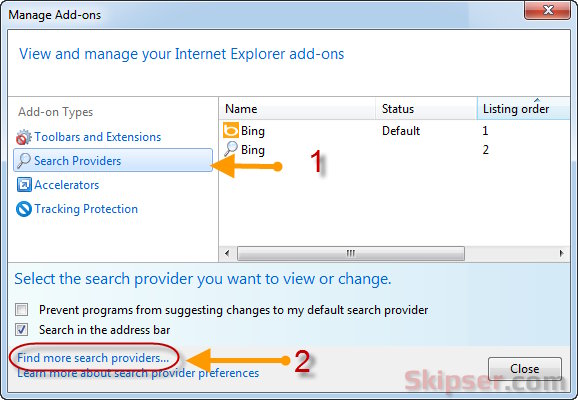
Another way is to go to "Options -> Manage Addons -> Search Providers" and use the "Find more search providers" link. This will take you to a page with a huge list of search addon's from various providers and you need to search and find Google from the list.
Directly adding it from the addon page is much easier and faster option. Here's a video to make it easier.
Also see: The most silly windows calculater bug.