The "New Tab Page" feature was added to Firefox in version 13 and displays thumbnails of your most recently visited websites. You just need to click on a thumbnail to open that website. It was first introduced by Opera which they called "Speed Dial" and Chrome was one of the early adopters.
A lot of us would find the "New Tab Page" really convenient as it saves the time and effort spent in typing URLs or searching for bookmarks. A total of 9 thumbnails shown in a (3*3) grid are big enough to easily identify the website you want to open.
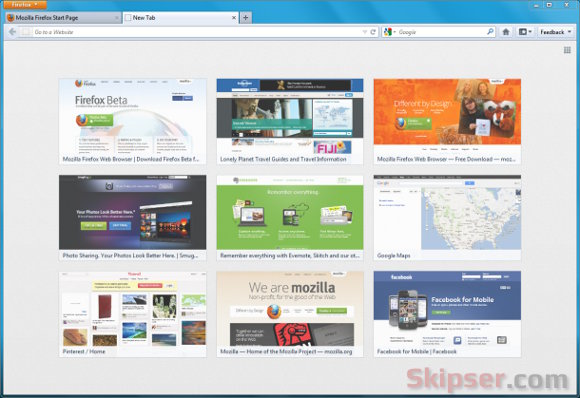
But this has some disadvantages too. You might not want anybody who just happen to be in front of your computer to know the sites you frequent. So for those of us who don't want this feature, there are two ways to disable it -
1. Using the "Hide New Tab Page" button.
Open Firefox and in a new tab, you can find the "Hide New Tab Page" button on the top right of the screen. Just click on it and Firefox will hide the thumbnails shown. Please note that the thumbnails are only hidden, not disabled. That means if you or anyone else hits the button again, your frequently visited site history will be revealed.
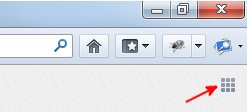
You could also hide the thumbnails by setting "browser.newtabpage.enabled" to "False" from the about:config page.
2. Disabling thumbnails permanently.
- Type about:config in your Firefox address bar and click on "I'll be careful I promise" warning.
- Type "newtab" in the search box.
- From the preferences that filter out, Double click on "browser.newtab.url" and change its value to "about:blank".

That's it, from now on, opening a new tab won't show the thumbnails again. You can easily revert back to showing thumbnails by setting the value back to "about:newtab" any time.